text → lottie.json
Text to Lottie, in one sentence
Describe the animation you need and the vizGPT AI Lottie generator converts your text into production-ready Lottie JSON — previewed instantly, refined in conversation, and exported for web, iOS, and Android.
[01] What it means
What is text to Lottie?
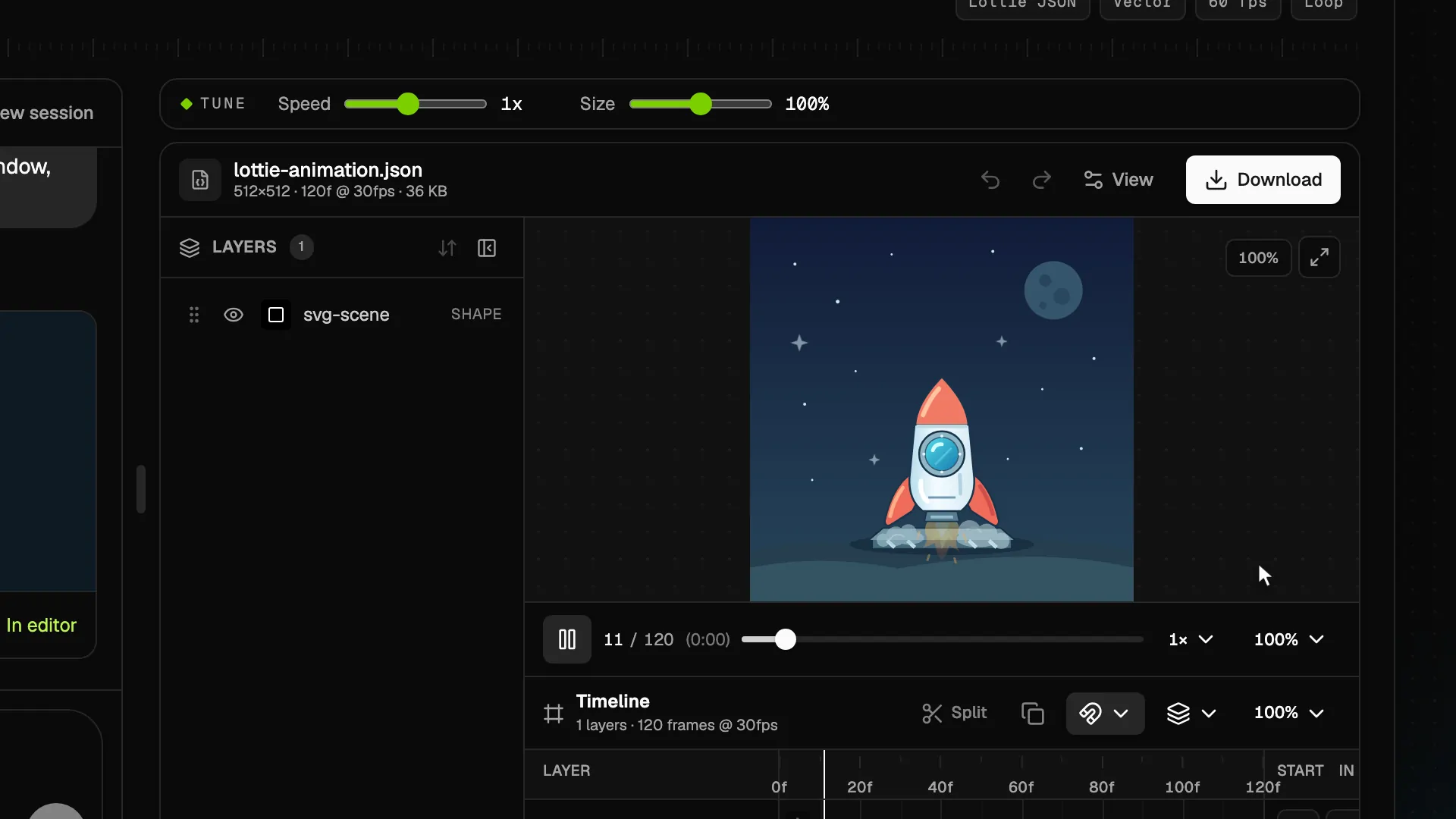
Text to Lottie is the fastest way to create a Lottie animation: instead of keyframing motion by hand in After Effects, you write a short description and an AI Lottie generator produces the animation file for you. The output is standard Lottie JSON — the same lightweight, vector-based format used by design and engineering teams for loaders, onboarding flows, success states, and animated icons.
vizGPT treats your prompt like a creative brief. The motion engine composes layers, keyframes, and real easing curves from your text, compiles them into valid Lottie JSON, and plays the result instantly in the browser. If the first version is not quite right, you direct it with follow-up messages — no timeline software, no plugin exports, no starting over.
[02] How it works
From text prompt to Lottie file in four steps
Write the text prompt
Describe the animation in plain language: the subject, the movement, the timing, and the mood. No keyframes, no timeline software.
AI converts text to Lottie
The vizGPT motion engine turns your text into a componentized motion spec — layers, keyframes, easing curves — and compiles it to valid Lottie JSON.
Preview and refine in chat
Watch the Lottie animation play instantly. Ask for changes in follow-up messages: “slower”, “make it blue”, “add a bounce at the end”.
Export production-ready files
Download Lottie JSON for web, iOS, Android, and React Native — or convert the result to GIF or SVG with the free vizGPT tools.
[03] Example prompts
What people turn into Lottie animations
The wordmark below is a real generated file — recolored live through Lottie color slots to sit on the dark stage. Copy a queued prompt into the generator, or write your own: subject, movement, timing, mood.
Rendered
› reveal a brand wordmark stroke by stroke, then hold the final frame
› A paper plane that loops through soft clouds, gentle ease-in-out, 3s
A looped scene with layered clouds, a curved flight path, and smooth easing — ready for empty states and onboarding.
Generate it →Queued · ready to render› Confetti burst when a task completes, 1.5 seconds, no loop
A celebratory micro-interaction with staggered particles and a clean final frame for success screens.
Generate it →Queued · ready to render› A minimal loading spinner: three dots orbiting with spring easing
A tiny, infinitely-looping loader that weighs a few kilobytes instead of a video file.
Generate it →[04] Why Lottie
Why generate Lottie instead of video or GIF?
Tiny files, fast pages
Lottie animations are JSON-based vectors — usually kilobytes, not megabytes. Your pages stay fast while they move.
Runs everywhere
One generated file plays on web, iOS, Android, and React Native through standard Lottie players.
Editable after generation
Text to Lottie output is not a flattened video. Open it in the Lottie Editor to tune colors, timing, and layers.
Loops and interactivity
Generated animations support looping, segments, and player controls — perfect for UI states and micro-interactions.
[05] Choosing an approach
Text to Lottie vs. the alternatives
- Text to Lottie vs. hand-keyframing
- Tools like After Effects with the Bodymovin plugin are powerful, but every keyframe is manual work. A text to Lottie generator gets you a working animation in seconds, which you can still refine by hand afterwards.
- Text to Lottie vs. video to Lottie
- Video conversion traces existing footage. Text to Lottie creates new motion from a description — no source video needed. Have footage instead? Use the Video to Lottie converter. Video to Lottie converter →
- Text to Lottie vs. stock libraries
- Stock Lottie marketplaces offer fixed files that rarely match your brand. Generating from text gives you animations with your colors, your timing, and your story — and you can iterate until they fit.
Everything around the generator is free
[06] FAQ
Text to Lottie questions, answered
- What is text to Lottie?
- Text to Lottie means converting a written description into a Lottie animation file. You type a prompt like “a heart that beats twice”, and the AI generates Lottie JSON — a lightweight, vector-based animation format that plays on web and mobile.
- How does the AI Lottie generator work?
- vizGPT turns your text prompt into a structured motion spec with layers, keyframes, and easing curves, then compiles that spec into valid Lottie JSON. Because the output is compiled rather than guessed, it renders consistently across Lottie players.
- Can I edit the generated Lottie animation?
- Yes. You can refine the animation with follow-up prompts in the generator, or open the file in the free vizGPT Lottie Editor to adjust timing, easing, colors, and layers manually.
- Can I convert the result to GIF, SVG, or video?
- Yes. vizGPT includes free converters: Lottie to GIF for sharing anywhere, Lottie to SVG for vector extraction, and a Lottie Preview tool for testing files before you ship them.
- Is text to Lottie free to use?
- You can start generating for free with a vizGPT account. The surrounding toolchain — Lottie Editor, Lottie Preview, and the converters — is free and requires no login.
- Where can I use the generated animations?
- Anywhere Lottie is supported: websites via lottie-web or dotLottie players, iOS and Android apps, React Native, and design tools that accept Lottie JSON. Typical uses include onboarding flows, loaders, success states, icons, and marketing pages.
[07] Your turn
Turn your next sentence into a Lottie
Sign in to start with free credits. Lottie downloads require a paid plan.